

Black Friday 2026
Hold it yourself: twelve acts for Black Friday
Updated November 3, 2026
0 of 6 done before you buy. Your ticks are saved in this browser only.
0 of 6 done since it arrived.
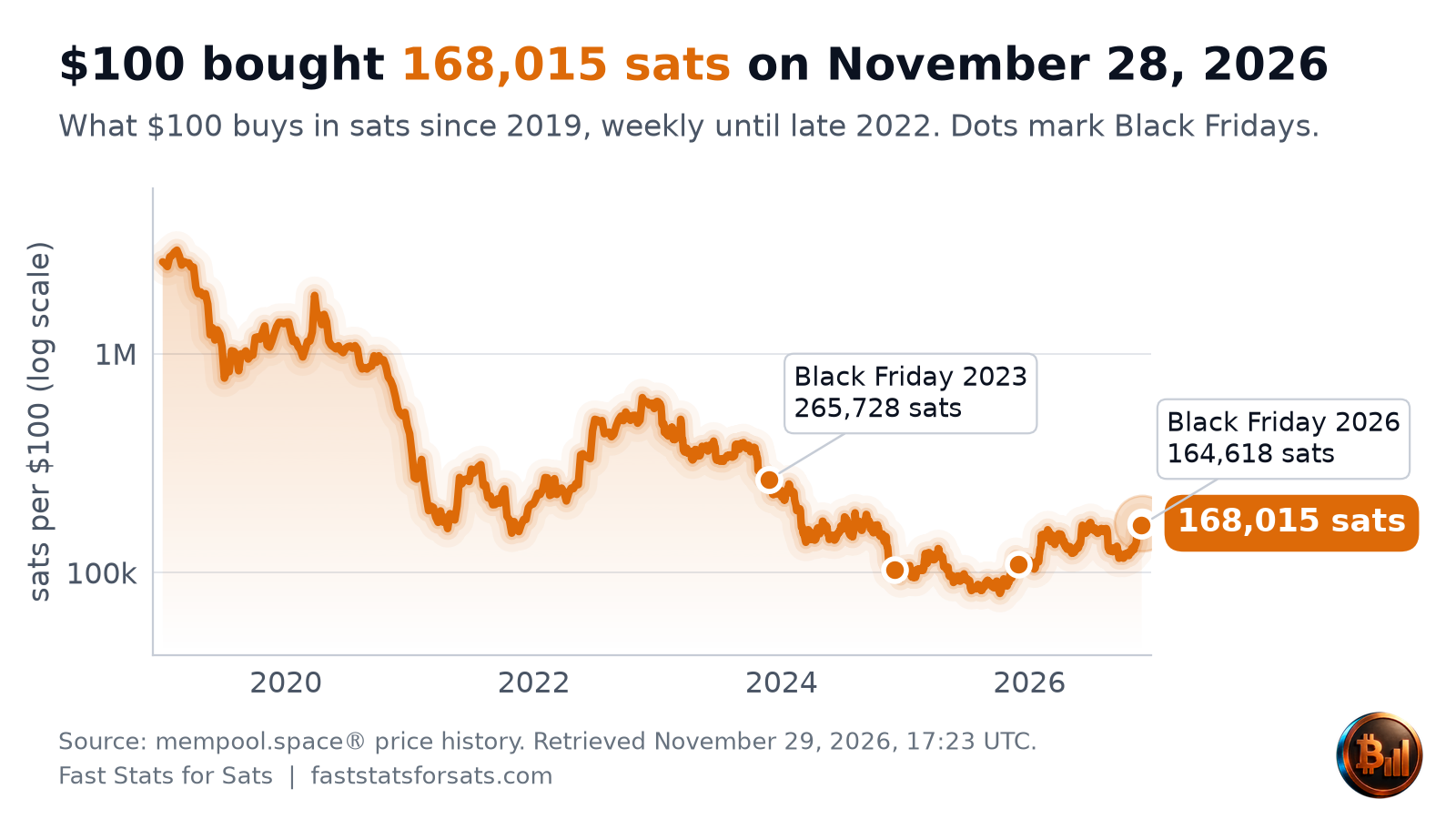
If a hardware wallet is on your Black Friday list, these twelve acts help you decide whether you need one, buy it safely, and set it up before it holds your savings. $100 buys 166,502 sats at the current price (as of November 29, 2026, 17:23 UTC). Sats are the smallest unit of bitcoin.
The chart shows how many sats $100 bought since 2019, with each Black Friday since 2023 marked. A wallet priced in dollars costs more sats when bitcoin's price is lower and fewer when it is higher. It cannot tell you what bitcoin will do next.
A sale is a good reason to buy a wallet you already need. It is not a reason to need one. Do one at a time. Delivery can take longer than the hands-on work.
Your twelve acts
The first six come before you buy. The other six come when the device arrives.
Before you buy
- Decide whether you need one yet. Compare an exchange account, a phone wallet, and a hardware wallet. There is no universal balance at which you must buy a hardware wallet. Guide: How to store sats safely.
- Learn what it protects. A separate device protects the keys and approves transactions. Someone with a complete backup can usually spend the bitcoin without your device or PIN. Guide: How a bitcoin wallet works, on Fast Facts.
- Compare the models. Look at the screen, phone support, backup method, and how each one protects your keys. A bigger price tag does not fix a poor backup. Guide: Hardware wallets compared.
- Buy from the maker or a seller it lists. Use the maker's store or its listed authorized sellers. Open the maker's site from an address you type, not from an ad or a deal email. Check the maker's current price, shipping, availability, and compatibility before ordering. Guide: Hardware wallets compared.
- Plan where the backup will live. Keep the backup separate from the device. Paper is vulnerable to fire and water. A suitable metal backup can offer better protection. Match it to your wallet's backup format. Guide: How to store sats safely.
- Decide whether you want help. Some people would rather have a person guide the setup. A legitimate helper can guide the process without seeing your backup words or controlling your funds. Guide: How to set up a hardware wallet.
When it arrives
- Check the device first. Follow the maker's packaging and authenticity checks. Stop if the device is already set up or comes with pre-filled recovery words. Guide: How to set up a hardware wallet.
- Install the official app. Go directly to the maker's site. Avoid search ads, message links, and unsolicited "support" downloads. Guide: How to set up a hardware wallet.
- Create the wallet and record the backup. Write the recovery words exactly as shown, in order. Never photograph the backup, upload it, or share it with a helper. Guide: How to set up a hardware wallet.
- Check the backup before you fund it. Use the maker's backup-check function where available. A backup is useful only if it restores the wallet. Find mistakes while the wallet is empty. Guide: How to set up a hardware wallet.
- Test with a small amount. Choose Receive in the official app and verify the complete address on the hardware wallet's screen. Send a small amount from your exchange. Then send a little to another wallet you control, checking the details on the device. Guide: How to set up a hardware wallet.
- Leave a family recovery plan. Write down who to call, what exists, and where to look. Never write recovery words, a PIN, a passphrase, or a password on the plan. Guide: A family recovery plan for your bitcoin.
What you will have learned
You will know whether you need a hardware wallet, how to buy one safely, how to set it up and check its backup, and how to leave a plan your family can follow.
A properly set-up wallet is more useful than a premium model still in its box.